5 Desk Changes That Fix the 3pm Back Ache
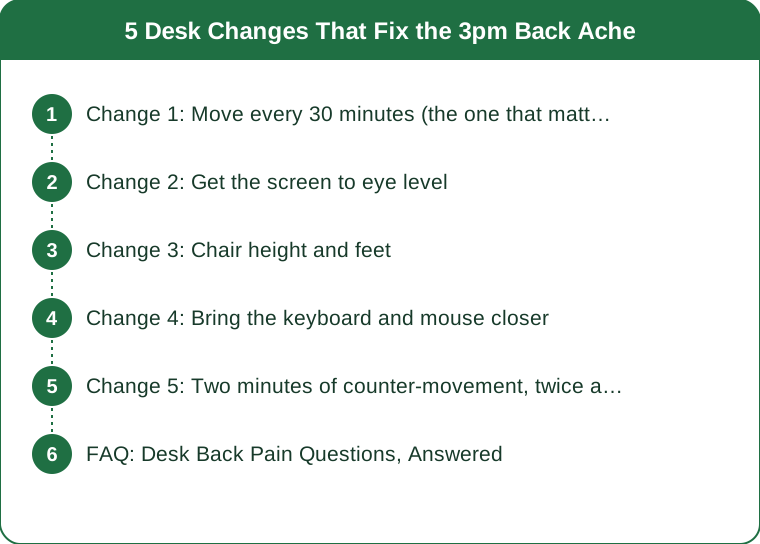
Quick Answer: Afternoon back pain is usually a duration problem rather than a posture problem - tissue loaded in one position for hours becomes uncomfortable regardless of how good that position is. The five changes that help most, in order: move every 30 minutes, raise the screen to eye level, get the chair height and feet right, bring the keyboard closer, and add two minutes of counter-movement twice a day.
There’s a specific pattern a lot of desk workers know: fine in the morning, aware of the back around two, genuinely uncomfortable by four.
The usual advice is ‘sit up straight’, which doesn’t help because it isn’t the problem. The best posture held for four hours is still four hours in one position, and that’s what the afternoon ache is actually reporting.
This is general information, not medical advice. Back pain with numbness, tingling, weakness, or pain radiating down a leg is a different situation and warrants assessment.

Change 1: Move every 30 minutes (the one that matters most)
If you do only one thing on this list, do this one. It outperforms every equipment change.
Why static loading causes pain. Spinal discs and the surrounding soft tissue rely on movement for fluid exchange - they’re poorly supplied with blood and depend on load changing to move fluid in and out. Sustained static loading in any position gradually reduces that exchange, and the tissue registers it as discomfort. This is why the ache builds through the day rather than appearing suddenly, and why it’s worst in the afternoon.
It’s also why the perfect ergonomic chair doesn’t solve it. A better position distributes load better; it doesn’t change position over time.
What to actually do:
- Stand up every 30 minutes. Not a long break - 30 to 60 seconds is enough to change the loading pattern.
- Set a recurring timer, because you will not remember. This is the practical crux of the whole thing.
- Attach it to something existing - stand for every phone call, refill water hourly, stand while reading anything you don’t need to type into.
The evidence points toward frequency mattering more than duration. Brief interruptions to sitting, repeated often, appear more useful than one long break. Six 30-second stands beat one five-minute walk, though ideally you’d have both.
If you have a sit-stand desk, the same principle applies - standing still for three hours produces its own set of problems, particularly in the feet, legs, and low back. Alternate roughly every 30-45 minutes rather than switching once a day.
Change 2: Get the screen to eye level
The second-biggest change, and the most commonly wrong setup in home offices.
The problem with a laptop on a desk: the screen sits roughly 30cm too low, which pulls the head forward and down. The head weighs around 5kg, and the load on the neck and upper back increases substantially as it moves forward of the shoulders - which is why sustained forward head position produces upper back and neck ache, and often headaches.
The fix:
- Top of the screen at or slightly below eye level
- Screen roughly an arm’s length away
- Directly in front, not off to one side. A screen at an angle produces sustained rotation, which is worse than a bad height.
For laptop users this requires two items: a laptop stand and a separate keyboard and mouse. You cannot fix a laptop’s ergonomics without separating the screen from the keyboard - raising the laptop puts the keyboard too high, and lowering it puts the screen too low. This is the single most common unfixable-seeming setup problem and it costs about the price of two takeaways to solve.
A stack of books works as well as a stand. The aesthetics are the only difference.
For dual monitors: primary screen directly in front, secondary angled beside it. If you use both equally, centre the gap between them and accept a small compromise on both, rather than spending the day rotated toward one.
On bifocals or varifocals: the usual screen height guidance often doesn’t apply, because reading through the lower part of the lens means tilting the head back. Lower the screen in that case, or ask your optician about dedicated computer lenses.
Change 3: Chair height and feet
Most chairs are set at the wrong height, and the effect runs all the way up the chain.
Set the chair by your elbows, not by your legs. Elbows at roughly 90 degrees with shoulders relaxed when your hands are on the keyboard. That’s the anchor point.
Then deal with the feet. If the chair is at the right height for your arms and your feet don’t rest flat on the floor, use a footrest - a box, a ream of paper, anything stable. Dangling feet mean the front edge of the seat presses into the back of the thighs, which restricts circulation and causes people to slide forward into a slumped position within about twenty minutes.
The other checks:
- Hips slightly higher than knees. A seat tilted very slightly forward encourages a neutral pelvis; a seat that slopes back pushes you into a tucked pelvis and a rounded low back.
- Backrest supporting the lower back. If your chair has no lumbar support, a rolled towel at belt height works genuinely well and costs nothing.
- Sit fully back in the chair. Perching on the front edge means the backrest does nothing at all, which is the most common way an expensive chair provides no benefit.
On the armrests: they should support the forearms lightly when resting, and not be so high that they push the shoulders up. Shoulders held elevated for hours is a very common and rarely-noticed cause of upper back and neck ache - if your armrests don’t adjust low enough, removing them entirely is often better than leaving them too high.

Change 4: Bring the keyboard and mouse closer
An under-appreciated change with a disproportionate effect on the upper back.
The problem: a keyboard pushed away, or a mouse off to the side, means the arms reach forward and out. Reaching arms have to be held there by the shoulder and upper back muscles continuously, which is a low-level sustained contraction for hours.
What to change:
- Keyboard close enough that elbows stay at your sides, roughly at a right angle
- Mouse immediately beside the keyboard, not further out. If you have a full-size keyboard with a number pad you don’t use, a compact keyboard brings the mouse meaningfully closer - a genuinely effective change for anyone with one-sided shoulder ache.
- Wrists straight and floating rather than bent up over a wrist rest while typing. Wrist rests are for resting between typing, not during.
- Nothing between you and the desk edge. Papers and clutter pushing you back is a real and invisible cause of reaching.
The one-sided ache clue: if your discomfort is clearly worse on your mouse side, this is almost certainly the cause. Mouse position is the most common source of asymmetric upper back and neck pain in desk workers, and it’s easily fixed.
Also worth checking: the phone. Cradling a handset between ear and shoulder for calls loads the neck asymmetrically and hard. Headset or speaker, every time.
Change 5: Two minutes of counter-movement, twice a day
Not a workout - a deliberate reversal of the shape you’ve been holding.
The logic: desk work holds you in flexion - hips bent, spine slightly rounded, shoulders forward, head forward. The antidote is extension and rotation, which is precisely what nothing in the day provides.
The two-minute sequence, mid-morning and mid-afternoon:
- Standing back extension. Hands on the low back, gently arch backwards. 10 repetitions, slow. Should feel like relief, not pain.
- Doorway chest stretch. Forearm on the frame, step through. 30 seconds each side.
- Seated or standing rotation. Turn to look behind you, hold. 5 each side.
- Chin tucks. Draw the chin back to make a double chin, hold 3 seconds. 10 repetitions. The direct counter to forward head position.
- Shoulder blade squeezes. 10 repetitions, holding 2 seconds each.
Two minutes. Twice a day. That’s it.
Why twice rather than one longer session: the same reason movement breaks work - it’s about interrupting sustained loading, and interrupting it twice is better than once.
What to add outside work hours: anything that loads the posterior chain and upper back. Rows, deadlifts, face pulls, and carries all directly counter desk posture, and two strength sessions a week does more for chronic desk-related discomfort than any single ergonomic purchase.
And the thing that ties it all together: the ache is telling you about duration, not damage. The response is to change position more often, not to find a better position and hold it harder.
FAQ: Desk Back Pain Questions, Answered
Is a standing desk the answer?
Helpful as an option, not as a solution. Standing all day causes its own problems - foot, leg, and low back discomfort are common. The benefit comes from alternating, which is what a sit-stand desk enables rather than what it guarantees.
Do I need an expensive ergonomic chair?
A decent adjustable chair is worth having, and the adjustment matters far more than the price. A well-set-up mid-range chair with a rolled towel for lumbar support beats a poorly adjusted premium one.
Why does it only hurt in the afternoon?
Cumulative static loading. Tissue tolerance decreases over hours of sustained position, so the same setup that’s fine at 9am is uncomfortable at 3pm. It’s the clearest possible evidence that duration rather than posture is the issue.
Should I use a kneeling chair or a ball?
Both change the loading pattern, which is genuinely useful, and neither is inherently better for the spine. A ball is fine for part of the day and tiring for a whole one. Variety is the actual mechanism in both cases.
When should I see someone about it?
If it’s not improving after a few weeks of these changes, if it wakes you at night, if there’s numbness, tingling, or weakness, or if pain radiates below the knee. A physiotherapist can assess it specifically, which an article can’t.
TL;DR:
- Afternoon back ache is a duration problem - the best posture held for four hours is still four hours
- Stand every 30 minutes for 30-60 seconds; frequency beats duration, and a timer beats intention
- Screen top at eye level, arm’s length away, directly in front - laptop users need a stand plus separate keyboard
- Set chair height by your elbows, then fix the feet with a footrest if they dangle
- Bring keyboard and mouse close; one-sided ache is almost always mouse position
- Two minutes of extension and rotation, twice a day, plus two strength sessions a week
The body isn’t complaining about your posture. It’s complaining about how long you’ve been in it.
Keep Reading
This article is for general informational purposes only and is not medical advice. It is not a substitute for professional diagnosis or treatment. Always consult a qualified healthcare provider about your individual situation, especially before making significant changes to your diet or exercise routine.